Showing posts with label Apple News. Show all posts
Tuesday, 19 June 2012

The ultimate list of new iPhone - iOS 6 features

0 comments
As expected, Apple took the wraps off the latest iteration of its mobile operating system last week. And although it may not be quite the upgrade that its predecessor was, iOS 6 still includes a ton of new features and other enhancements.

We’ve covered a number of these additions here on iDB already, but it’s hard to keep up with each and every new discovery. So, we’ve decided to put together a census of all of the new changes. Here’s iDB’s ultimate list of new iOS 6 features…


Note: Some of them are device-specific, so make sure to check out our feature compatibility guide for more information.


Phone

The Phone app gets a slight upgrade in iOS 6 with a new look, and at least one significant enhancement:
  • Decline options – now when declining phone calls, users have the option to respond with a preset or custom text message or set a callback reminder.

Facebook

iOS 6 includes deep, system-level Facebook integration:
  • Photo uploads - users can now post pictures to the social networking site directly from the Photos app.
  • Tap to Post - users can now update their Facebook statuses (and tweet) from the Notification Center.
  • Like content - the Facebook option to ‘Like’ something is now available in the App, iBooks and iTunes stores.

FaceTime

The video calling app gets two welcome new features in iOS 6:
  • FaceTime over cellular – users can now make FaceTime calls over a cellular connection, instead of being forced to find a Wi-Fi network.
  • Number/ID unification – users can now make FaceTime calls from their iPads and other devices using either their Apple IDs or their phone numbers.

Siri

Siri receives quite the upgrade in iOS 6, with the ability to answer a number of new questions, and perform new tasks:
  • Restaurants - Siri can now search for restaurants based on price and outdoor seating availability, in addition to location and cuisine. It can also now pull up photos, Yelp reviews, and make reservations via OpenTable.
  • Movies – in iOS 6, Siri can lookup showtimes, movie facts, and play trailers. It can also bring up movie ratings and reviews from Rotten Tomatoes.
  • Sports – the digital assistant can now look up sport scores for current and past games, as well as schedules and team rosters for baseball, basketball, football, hockey and soccer.
  • Launch apps – Users can now launch applications — both stock and third party — by telling Siri to “launch (insert app name here).”
  • Siri for iPad - the once iPhone 4S-exclusive feature is now available on Apple’s latest tablet.

Maps

The Maps app has been completely redesigned from the ground up in iOS 6. And not only does it look different, but it also has a handful of new features:
  • 3D Flyover view – thanks to the 3D technology from recently-acquired C3 Technologies, Maps now features gorgeous 3D models of buildings, landmarks, and monuments.
  • Turn-by-turn – Maps can now give users audible turn-by-turn directions to help them get to their destinations.
  • Traffic – Maps now uses real-time traffic conditions to calculate ETAs. It can also offer details about incidents and alternate routes to speed up travel times.

Clock

The Clock app in iOS 6 gets a minor new feature, and a fresh coat of paint for Apple’s tablet:
  • MP3 Alarm tones - users can now set songs as Alarm tones in iOS 6
  • New iPad app - iOS 6 brings the stock Clock app to the iPad. It doesn’t look exactly like its iPhone counterpart, but it performs all of the same functions.

Safari

Safari didn’t get quite the makeover that other apps did, but it did receive a couple of nice enhancements:
  • iCloud tabs – open a website in a new Safari tab on your desktop, and it automatically populates in mobile Safari on your iOS 6 device.
  • Offline Reading List – now Safari’s Reading List feature can save entire articles — not just links — for later viewing on any iOS device.
  • Media uploads – users can now upload photos and videos to websites from within Safari.
  • Full-screen – iPhones and iPod touches can now view web pages in full-screen when in landscape-mode.

Photos

There aren’t many new features in the Photos app in iOS 6, but there are a few notable changes:
  • New share menu – There’s a new sharing menu in iOS 6 that allows users to upload photos and videos to Facebook, Twitter, and other services.
  • Shared Photo Streams – users can now easily share media from their Photo Streams with their friends and family, either via the Photos app, iPhotos, or even the web.

Passbook

Passbook is a brand new application in iOS 6 that organizes all of a user’s digital gift cards, event tickets and boarding passes. Cards are location-aware, so if a user approaches a building connected with one of the cards in their Passbook app, they receive a push notification.

Mail

The new Mail application in iOS 6 is exactly like the old one, but with the addition of a few handy features:
  • VIP Lists – a list of the contacts that you’d like to receive notifications from upon every email.
  • Pull-to-refresh – users can now use the popular pull-to-refresh gesture to refresh their inbox.
  • In-app attachements – users can now attach photos and videos to emails without ever leaving the Mail application.

App Store

After nearly four years without any major changes, the App Store gets a significant redesign in iOS 6, as do the iBook and iTunes stores. They look different, act different, and make browsing through content more enjoyable. Oh, and you don’t get kicked out of the app when you start a download anymore.

Settings

Apple made a few changes to the Settings app in iOS 6 in order to keep up with the other new features.
  • Do Not Disturb - a new option for users to turn off all push notifications and alerts with a single toggle. You can also choose contacts and apps to not be muted by this feature.
  • Relocated Bluetooth – the Bluetooth toggle has been moved to the main Settings pane in iOS 6, making it easier for users to access the option.
  • Government alerts - users can enable native Government Alerts in iOS 6, but this will undoubtedly be region and carrier-specific.
  • Privacy settings - users can now see what data each app is accessing — Calendar, Contacts, etc. — and have the ability to disable them.

Miscellaneous

Other than the above-mentioned features and enhancements, there are a few other changes in iOS 6 worth pointing out:
  • Color-matching status bar
  • Separate Podcast app
  • New Emoji icons
  • ‘New’ app ribbons
  • Stream or download songs in iTunes Match
  • Retina-friendly shutdown spinner
  • Custom dictionary in the cloud
  • New UI in Music app
We plan to continue to add to this list as more new features come to light. But if you feel like we’ve missed something, be sure to let us know about it in the comments below and we’ll add it.

So, what do you think of iOS 6 so far?


Tks :iBlog
Continue reading →
Friday, 27 April 2012

LinkedIn now avilable for iPad

0 comments
LinkedIn has launched their new iPad application. They have also made it as a universal app for iPad and iPhone that has been updated to version 5.0. The app has also been Optimized for iPad’s Retina display and brings new features such as Calendar feature that lets you LinkedIn profile information for people you’re meeting with, news updates and more.

New features in LinkedIn for iPhone and iPad

Calendar feature: Get an informative snapshot of all the people you will be meeting with that day and everything you need to know about them.
  • News you can use: Get timely and relevant news surfaced by what your connections and industry peers are sharing and reading.
  • Build your professional brand: Easily connect and follow-up with your professional peers and share your expertise.
  •  
Download LinkedIn for iPad from the Apple iTunes Store for free. The LinkedIn app for Android has also been updated with the new Calender feature.


Continue reading →

Apple Products Sales Report in Q2 2012

0 comments
Apple has reported 94% increase in Net profit Year-over-Year in their earnings for Q2 2012 that ended March 31, 2012. The company has reported a revenue of $39.2 billion with a net profit od $11.6 billion. The international sales in this quarter is 64% of the quarter’s revenue. They sold 35.1 million iPhones, 11.8 million iPads, 7.7 million iPods and 4 million Macs during the quarter.


The iPhone has seen 88% unit growth over the year-ago quarter. The launch of the New iPad boosted the sales that increased the unit sales to 151% compared to over the year-ago quarter, while the iPod Sales has seen 15% unit decline Year-over-Year.

Press Release
CUPERTINO, California—April 24, 2012—Apple® today announced financial results for its fiscal 2012 second quarter ended March 31, 2012. The Company posted quarterly revenue of $39.2 billion and quarterly net profit of $11.6 billion, or $12.30 per diluted share. These results compare to revenue of $24.7 billion and net profit of $6.0 billion, or $6.40 per diluted share, in the year-ago quarter. Gross margin was 47.4 percent compared to 41.4 percent in the year-ago quarter. International sales accounted for 64 percent of the quarter’s revenue.

The Company sold 35.1 million iPhones in the quarter, representing 88 percent unit growth over the year-ago quarter. Apple sold 11.8 million iPads during the quarter, a 151 percent unit increase over the year-ago quarter. The Company sold 4 million Macs during the quarter, a 7 percent unit increase over the year-ago quarter. Apple sold 7.7 million iPods, a 15 percent unit decline from the year-ago quarter.

“We’re thrilled with sales of over 35 million iPhones and almost 12 million iPads in the March quarter,” said Tim Cook, Apple’s CEO. “The new iPad is off to a great start, and across the year you’re going to see a lot more of the kind of innovation that only Apple can deliver.”

“Our record March quarter results drove $14 billion in cash flow from operations,” said Peter Oppenheimer, Apple’s CFO. “Looking ahead to the third fiscal quarter, we expect revenue of about $34 billion and diluted earnings per share of about $8.68.”

Continue reading →
Wednesday, 18 April 2012

New iPad coming to India on April 27th, starts at Rs.30,500

0 comments
Apple has just announced that the New iPad would be available in India on 27th April 2012. The New iPad would be available in South Korea incuding Brunei, Croatia, Cyprus, Dominican Republic, El Salvador, Guatemala, Malaysia, Panama, St Maarten, Uruguay and Venezuela on Friday, April 20. It will be available in Colombia, Estonia, India, Israel, Latvia, Lithuania, Montenegro, South Africa and Thailand on beginning on Friday, April 27.

The base 16GB WiFi model of the New iPad will be available for Rs.30,500 including taxes and the base 16GB WiFi+4G Model will be available for Rs.38,900.

Prices for the new iPad

Wi-Fi Only : 16GB Rs. 30500, 32GB Rs. 36500, 64GB Rs. 42500.
Wi-Fi +4G : 16GB Rs. 38900, 32GB Rs. 44900, 64GB Rs. 50900.

Press Release
CUPERTINO, California―April 16, 2012―Apple® today announced the new iPad®, the third generation of its category defining mobile device, will arrive in South Korea and 11 additional countries on Friday, April 20. The new  iPad features a stunning new Retina™ display, Apple’s new A5X chip with quad-coregraphics and a 5 megapixel iSight® camera with advanced optics for capturing amazing photos and 1080p HD video. The new iPad still delivers the same all-day 10 hour battery life* while remaining amazingly thin and light.

In addition to South Korea, the new iPad also will be available beginning on Friday, April 20 in Brunei, Croatia, Cyprus, Dominican Republic, El Salvador, Guatemala, Malaysia, Panama, St Maarten, Uruguay and Venezuela. Beginning on Friday, April 27, the new iPad will be available in Colombia, Estonia, India, Israel, Latvia, Lithuania, Montenegro, South Africa and Thailand.

The new iPad Wi-Fi models will be available in black or white for a suggested retail price of $499 (US) for the 16GB model, $599 (US) for the 32GB model and $699 (US) for the 64 GB Model. The iPad Wi-Fi + 4G models will be available for a suggested retail price of $629 (US) for the 16GB model, $729 (US) for the 32GB model and $829 (US) for the 64GB model.** The new iPad will be sold through the Apple Online Store (www.apple.com) and select Apple Authorized Resellers. Additionally, iPad 2 is available at a more affordable price starting at just $399.

*Battery life depends on device settings, usage and other factors. Actual results vary.

**4G LTE is supported only on AT&T and Verizon networks in the U.S. and on Bell, Rogers and Telus networks in Canada. Data plans sold separately.

Continue reading →
Tuesday, 3 April 2012

IPL Apps for iPhone and iPad

0 comments
With just 1 day remaining for the Indian Premier League (IPL) Season 5 to start, here are some IPL apps for your iPhone and iPad. These apps lets you follow IPL scores, fixtures and commentaries on the move.


IPL Apps for iPhone and iPad
  • IPL5 – It shows you the schedule of the upcoming IPL 2012 T20 tournament matches, even when you are offline. It provides you all the information about the IPL matches. You can also view schedule by filtering your favorite team. You can also try the ad-free premium version at $0.99.
  • IPL 2012 – It provides you all the info about the IPL events and matches. You can get the latest updates on your device during the time of events. Push Notification feature is added with the app to know the updates consequently in next update.
  • IPL Cricket – This app offers IPL wallpapers, schedule much more.
  • IPL Dugout – live score updates, schedule of all matches, results of all previous IPL cricket tournaments, latest IPL news and leader boards. It also lets you view venues of matches happening near you and also will give you a list of popular places in your own city which would be showing the match.
  • IPL T20 – It is the official IPLt20 app brings to you all the exclusive content from DLF IPL 2012, including News, Features, Interviews, Virtual Replay, Live Scores, Fixtures, Team and player information and all the statistics from the tournament.
  • IPL Mania for iPad – It offers reminders for your favorite IPL team’s matches right on your mobile. It also offers all the information you need about the participating teams, IPL’s Twitter feed and full Schedule of tournament.
All these apps are free of cost. Download them and enjoy the IPL right from your phone.

Continue reading →
Saturday, 17 March 2012

Best Apps for the New iPad 3

0 comments
              The New iPad which was announced by Apple few days back with an awesome retina display will be available for purchase today at the stores. Apple had already mentioned that the pre-orders are sold out and this is similar to previous releases of iPad.

Developers have already started to polish their apps for the new retina display. If you have already got the new iPad with retina display, Apple has a suggestion for apps on the new iPad.


It is a combination of  new apps , Social networking like Twitter, games etc.

You can access the app list from here.


Continue reading →
Sunday, 11 March 2012

Apple iOS 5.1 & iTunes 10.6 now available for download

0 comments
            Following its media event that just ended, as promised, Apple has just released its iOS 5.1 update. The new update, which has a nice list of features, is now available in a 180MB over the air update.

The most notable features for iOS 5.1 include Siri support for Japanese users, a new camera app for iPad, and a new camera shortcut.


iOS 5.1 is available for the iPad 3, iPad 2, iPad, iPhone 4S, iPhone 4, iPhone 3GS, iPod touch 4G, and iPod touch 3G. Additionally, Apple released iOS 5.0 for the Apple TV 3, and Apple TV 2.

iOS 5.1′s full change log:


As expected, if you download Apple’s iOS 5.1 you will be losing your jailbreak.
If you’re having trouble downloading OTA, you can download iOS 5.1 directly from our downloads page until it hits iTunes. iOS 5.1 should be available on iTunes soon, with iTunes 10.6 launching around the same time.

Apple releases iTunes 10.6


Apple has just released iTunes 10.6, with the ability to play 1080P video. You can download the update through iTunes!


Continue reading →
Saturday, 10 March 2012

Apple iPad 2 gets a Price Cut in India

0 comments
                         Apple has cut the price of all models of the iPad 2 in India after it announced the new version of the iPad  earlier this week in the US.The entry level iPad 2 WiFi model gets the biggest cut of Rs.5000 whereas other models see cuts between Rs.2000 and Rs.4000. We already told you about the price of the 16GB WiFi only iPad 2 dropping to Rs.24500 , now we have confirmation from Apple that the entire iPad 2 line up will see a discount.


Apple announced during its iPad launch event that the iPad 2 will start at $399 in the US and the price cut is effective in India so fast ! If you don’t need the latest and greatest iPad , the iPad 2 is a great buy at these prices.

But then , if you want the latest iPad , you need to wait for the India launch or bug your cousins or friends abroad to pre-order one for you !


Continue reading →
Thursday, 8 March 2012

iPad 3 specs revealed

0 comments
        The new iPad 3 is nothing short of amazing. Of course the star of the show is the beautiful Retina display that brings 4 times more pixels to your screen that its predecessor. All this powered by Apple’s own A5X processor.

But what else is hiding under the hood of Apple’s new tablet? We have the full iPad 3 specs for you, right here…


Models:
  • Wi-Fi
  • Wi-Fi + 4G
Size and weight:
  • Height: 9.50 inches (241.2 mm)
  • Width: 7.31 inches (185.7 mm)
  • Depth: 0.37 inch (9.4 mm)
  • Weight: 1.44 pounds (652 g) – Wi-Fi model
  • Weight: 1.46 pounds (662 g) – 4G model
Storage:
  • 16GB
  • 32GB
  • 64GB
Display:
  • Retina display
  • 9.7-inch (diagonal) LED-backlit glossy widescreen Multi-Touch display with IPS technology
  • 2048-by-1536-pixel resolution at 264 pixels per inch (ppi)
  • Fingerprint-resistant oleophobic coating
  • Support for display of multiple languages and characters simultaneously
Chip:
  • Dual-core Apple A5X custom-designed, high-performance, low-power system-on-a-chip with quad-core graphics
Wireless and cellular:
  • Wi-Fi (802.11a/b/g/n)
  • Bluetooth 4.0 technology
  • Wi-Fi + 4G for AT&T model: LTE (700, 2100 MHz)3; UMTS/HSPA/HSPA+/DC-HSDPA (850, 900, 1900, 2100 MHz); GSM/EDGE (850, 900, 1800, 1900 MHz)
  • Wi-Fi + 4G for Verizon model: LTE (700 MHz)3; CDMA EV-DO Rev. A (800, 1900 MHz); UMTS/HSPA/HSPA+/DC-HSDPA (850, 900, 1900, 2100 MHz); GSM/EDGE (850, 900, 1800, 1900 MHz)
  • Data only
Carriers:
  • AT&T
  • Verizon
Cameras:
  • 5-megapixel iSight camera
  • Autofocus
  • Tap to focus
  • Face detection in still images
  • Video recording, HD (1080p) up to 30 frames per second with audio
  • Video stabilization
  • FaceTime camera with VGA-quality photos and video at up to 30 frames per second
  • Photo and video geotagging
Battery:
  • Built-in 42.5-watt-hour rechargeable lithium-polymer battery
  • Up to 10 hours of surfing the web on Wi-Fi, watching video, or listening to music
  • Up to 9 hours of surfing the web using cellular data network
  • Charging via power adapter or USB to computer system
Input/output:
  • 30-pin dock connector port
  • 3.5-mm stereo headphone minijack
  • Built-in speaker
  • Microphone
  • Micro-SIM card tray
Sensors:
  • Accelerometer
  • Ambient light sensor
  • Gyroscope
Location:
  • Wi-Fi
  • Digital compass
  • Assisted GPS – 4G models only
  • Cellular – 4G models only
Audio playback:
  • Frequency response: 20Hz to 20,000Hz
  • Audio formats supported: HE-AAC (V1 and V2), AAC (8 to 320 Kbps), Protected AAC (from iTunes Store), MP3 (8 to 320 Kbps), MP3 VBR, Audible (formats 2, 3, and 4, Audible Enhanced Audio, AAX, and AAX+), Apple Lossless, AIFF, and WAV
  • User-configurable maximum volume limit
  • Dolby Digital 5.1 surround sound pass-through with Apple Digital AV Adapter (sold separately)
TV and video:
  • AirPlay Mirroring to Apple TV (2nd and 3rd generation) at 720p
  • AirPlay video streaming to Apple TV (3rd generation) at up to 1080p and Apple TV (2nd generation) at up to 720p
  • Video mirroring and video out support: Up to 1080p with Apple Digital AV Adapter or Apple VGA Adapter (adapters sold separately)
  • Video out support at 576i and 480i with Apple Composite AV Cable (cable sold separately)
  • Video formats supported: H.264 video up to 1080p, 30 frames per second, High Profile level 4.1 with AAC-LC audio up to 160 Kbps, 48kHz, stereo audio in .m4v, .mp4, and .mov file formats; MPEG-4 video up to 2.5 Mbps, 640 by 480 pixels, 30 frames per second, Simple Profile with AAC-LC audio up to 160 Kbps per channel, 48kHz, stereo audio in .m4v, .mp4, and .mov file formats; Motion JPEG (M-JPEG) up to 35 Mbps, 1280 by 720 pixels, 30 frames per second, audio in ulaw, PCM stereo audio in .avi file format.


Continue reading →

The new iPad launching on March 16th, pre-orders start today

0 comments
                 One week folks, that’s all the waiting you’ll have to do before getting your hands on the new iPad.

You can pre-order the new iPad starting today, with availability on March 16th — the same day as the new Apple TV.


Thankfully, the prices for the devices have remained the same as the current generation iPads, with Wi-Fi only flavors going for $499, $599, and $699 for 16, 32, and 64GB respectively. LTE models will go for $629, $729, and $829 for the same amount of storage space.

As with the current generation, there will be both black and white versions, with separate LTE models for both Verizon and AT&T…


The new iPad will be initially available in 10 different countries on March 16th, which include the following: United States, Canada, United Kingdom, France, Germany, Switzerland, Japan, Hong Kong, Singapore, and Australia.


A week later, on March 23rd, the new iPad launch in various other areas including: Austria, Belgium, Bulgaria, Czech Republic, Denmark, Finland, Greece, Hungary, Iceland, ireland, Italy, Liechtenstein, Luxembourg, Macau, Mexico, Netherlands, New Zealand, Norway, Poland, Portugal, Puerto Rico, Romania, Slovakia, Slovenia, Spain, and Sweden.

Hopefully your country was included in either the March 16th or 23rd release date. if not, you can still consider importing the new iPad to your place of residence.


Continue reading →

The new iPad

0 comments
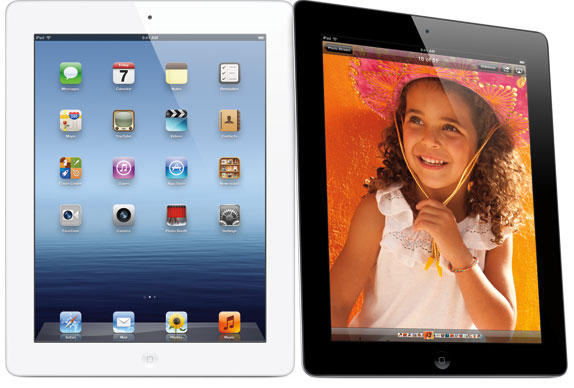
                Finally. After months of rumors and speculation, it’s finally here. Tim Cook has just unveiled the the new iPad. And though we feel like we’ve seen and heard enough about the device over the past few months to write a novel, none of that compares to the real deal.

As expected, the new iPad’s hardware has received some major upgrades. Sure, it might look similar to its predecessor. But when you take a peek under its hood, you can see that the iPad 3 is an entirely different animal…


The first feature announced for the new iPad is, of course, its Retina display. Just as suspected, the screen on Apple’s new tablet has a resolution of 2048 x 1536. Wow, that’s over a million pixels. 3.1 million total pixels to be exact.

Next up, the new iPad has an all new quad-core processor. Apple’s named it the A5X (weird). It’s 4X as fast as the popular Tegra 3 chipset, and should take iOS gaming to a whole new level.

The tablet is also packed with a new camera. The backside shooter is capable of taking 5MP pictures, and capturing full HD 1080p videos. But don’t let the 5MP part fool you, the system driving the camera is the same one Apple introduced in the iPhone 4S. So pictures should still turn out crystal clear.

And finally, as predicted, Apple has added 4G LTE technology to the new iPad — and not at the sake of battery life. The tablet will maintain its well-known 10 hour life point, and will be able to surf the web on LTE for 9 hours. Wow.

Continue reading →
Thursday, 8 December 2011

Flipboard for iPhone..!

0 comments
            Flipboard, popular social magazine app is now available for iPhone. This includes new feature Cover Stories, that uses a vertical flip to quickly catch up on some of the most interesting news, updates and photos being shared with you. You can also mute anyone you’d rather not hear from, and connecting to your social networks.


Features of Flipboard for iPhone
  • Cover Stories: Get a quick update on interesting stories and photos from all your social networks and favorite Flipboard content.
  • Social Networks: Enjoy everything in one place from Facebook, Twitter, LinkedIn, Tumblr,Instagram, Google Reader, Flickr and 500px.
  • Flipboard Accounts: Access to all the favorite content and social networks you saved on the iPad edition of Flipboard with a Flipboard  Account.
  • Content Guide: Browse recommended reading. Use + to add to your Flipboard.
  • Search Bar: Find social conversations, posts and feeds from any person or publication and on any topic from Tumblr, Facebook, Twitter, Flickr, RSS and Instagram.
  • Share Everywhere: Just one tap to share, like or comment to add to the conversation on the social network an item was posted to.
  • Fast Flip: Scan through pages as quickly as you can with just a flick of a thumb.
  • Read later: Use Instapaper or Read It Later to mark stories you want to save.
Download Flipboard for iPhone from the Apple iTunes store (iOS 4.0 or later) for free.

Continue reading →
Wednesday, 7 December 2011

Track and Recover Lost or Stolen iPhone with " Prey "

0 comments
           Prey is one of the popular app to track and recover lost or stolen laptops and phones. The service was available only for Android phones, but now they have released an app for iOS devices including iPhone, iPad and iPod.

If you’ve lost your iPhone or somebody has stolen it, Prey will find your phone, you can set off an alarm or even take a picture of the thief. The app is free of cost and the free service can be used to track of maximum of three devices at a time.


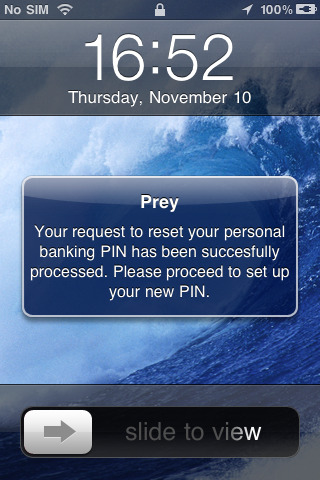
The app can set off an alarm or take a capture using the front camera when you set it as stolen. It can even track the exact location of the device using the GPS and Wi-Fi. Since the front camera cannot be activated directly the app informs the stolen user that the PIN needs to be changed and offer a slide to view button. As soon as the user slides it, a image capture is taken.

Prey settings
Features of the app;

GPS + Network-based geo-location (GSM+Wifi).
Delayed or On Demand activation (via push messaging).
Alert messages to user.
Front facing camera pictures support.
Loud alarm sound.

The free account can collect reports from your device in as low as 10 minutes. You can check the web dashboard and monitor the location and other details of the device lost. You need to first mark the device as lost in the web interface.
The app also features a camouflage mode in which the app disguises as a game.

You can download the app from App store.

Continue reading →
Monday, 21 November 2011

iPhone 4S Price in India

1 comments
     iPhone 4S coming is to India, which is really a great news for all fans waiting for this device. Airtel and Aircel is planning to bring the device to India and launch it on 25th November. But there was uncertainity about the pricing of it. There were rumors that the higher end model price could touch almost 50K INR which is on a higher side. But now even before the release, Airtel has confirmed the prices of iPhone 4S in India.

iPhone 4s price in India

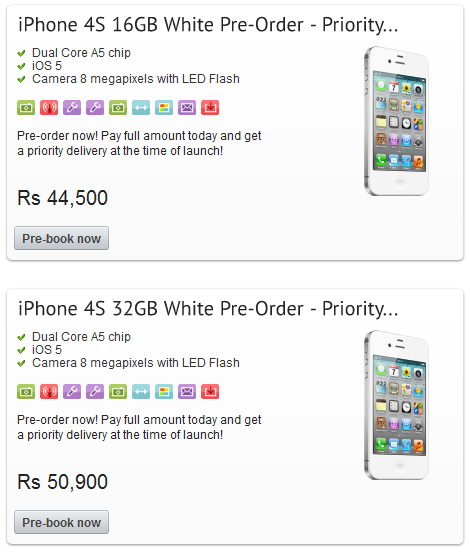
The iPhone 4S is available in both white and black and the prices are as follows;
  • iPhone 4S 16GB version- 44500 INR
  • iPhone 4S 32GB version- 50900 INR
At this price, the phone not affordable for many and seriously disappointing for all iPhone Fans in India. We too think the prices are too high and not worth the investment. There are also reports that the iPhone 4 refurbished version would be released in India for 22000 (approx). So are you getting the iPhone 4S ?

You can pre-order the iPhone 4S from Airtel.

Continue reading →
Tuesday, 15 November 2011

Aircel launching the iPhone 4S in India on Nov 25th

0 comments
         Aircel has now announced a date for it’s iPhone 4S launch. The operator just shared on it’s Facebook page that it is launching the iPhone 4S in India on Nov 25th. Yesterday Aircel and Airtel announced they are launching the iPhone 4S in India soon.


   We guess Aircel (and Airtel) might announce their pricing ( and weird money back plans ) on the 25th. We don’t have any details about the pricing but should have some info soon. The iPhone 4S packs a Dual Core CPU , 8MP Camera with Full HD video recording and the interesting virtual assistant Siri.

Looks wise its almost same as the previous iPhone – the iPhone 4S . The device runs on iOS 5 which is the latest operating system for iPhone , iPad and ipod Touch.

Pre-booking for iPhone 4S starts on Nov 18th according to Aircel.

Continue reading →
Tuesday, 18 October 2011

Complete List of New Features in iOS5

0 comments
               Apple had released the iOS5 few days back with lots of new features and changes. Some of the major changes are new split keyboard for iPad, iCloud support which syncs your files across devices, build in support for Twitter and many more. Below is the complete list of changes to iOS5 and some of these changes are specific to devices.
iOS5
This update contains over 200 new features, including the following:

Notifications
Swipe from the top of any screen to view notifications in one place with Notification Center
New notifications appear briefly at the top of the screen
View notifications from lock screen
Slide the notification app icon to the right on the lock screen to go directly to the app

iMessage
Send and receive unlimited text, photo, and video messages with other iOS 5 users
Track messages with delivery and read receipts
Group messaging and secure encryption
Works over cellular network and Wi-Fi*

Newsstand
Automatically organizes magazine and newspaper subscriptions on Home Screen
Displays the cover of the latest issue
Background downloads of new issues
Reminders for managing to do lists
Syncs with iCloud, iCal and Outlook
Location-based reminders when you leave or arrive at a location for iPhone4S and iPhone 4

Built-in support for Twitter
Sign-in once in Settings and tweet directly from Camera, Photos, Maps, Safari and YouTube
Add location to any tweet
View twitter profile pictures and usernames in Contacts

Camera improvements for devices with cameras
Double click the home button when device is asleep to bring up a camera shortcut on iPhone 4S, iPhone 4, iPhone 3GS and ipod (4th generation)
Volume Up button to take a picture
Optional grid lines to line up shots
Pinch to zoom in the preview screen
Swipe to camera roll from preview screen
Tap and hold to lock focus and exposure,iPad2 and iPod touch (4th generation) only support exposure lock

Photo improvements for devices with cameras
Crop and rotate
Red eye removal
One tap enhance
Organize photos into albums

Mail improvements
Format text using bold, italic, or underlined fonts
Indentation control
Drag to rearrange names in address fields
Flag messages
Mass mark messages as flagged, read or unread
Customize mail alert sounds
S/MIME

Calendar improvements
Year view on iPad and new Week view for iPhone and iPod touch
Tap to create an event
View and add event attachments

Game Center improvements
Use personal photos for your Game Center account
Compare your overall achievement scores with your friends
Find new Game Center friends with friend recommendations and friends of friends
Discover new games with custom game recommendations

AirPlay Mirroring for iPad 2 and iPhone 4S
Multitasking Gestures for iPad
Use four or five fingers to pinch to the Home Screen
Swipe up to reveal the multitasking bar
Swipe left or right to switch between apps

On-device setup, activation and configuration with Setup Assistant
Software update available over the air without tethering

iCloud support
iTunes in the Cloud
Photo Stream
Documents in the Cloud
Apps and Books automatic download and purchase history
Backup
Contacts, Calendar, and Mail
Find My iPhone

iPad
Redesigned Music app for iPad
Hourly weather forecast
Real-time stock quotes
Wireless sync to iTunes
Keyboard improvements
Split keyboard for iPad
Improved autocorrection accuracy
Improved Chinese and Japanese input
New Emoji keyboard
Personal dictionary for autocorrection
Optionally create keyboard short cuts for frequently used words

Accessibility improvements
Option to light LED flash on incoming calls and alerts for iPhone 4S and iPhone 4
Custom vibration patterns for incoming calls on iPhone
New interface for using iOS with mobility-impairment input devices
Option to speak a selection of text
Custom element labeling for VoiceOver

Exchange ActiveSync improvements
Wirelessly sync tasks
Mark messages as flagged, read or unread
Improved offline support
Save a new contact from a GAL service

More than 1,500 new developer APIs
Bug fixes
Products compatible with this software update
• iPhone 4S
• iPhone 4
• iPhone 3GS
• iPad 2
• iPad
• iPod touch (4th generation)
• iPod touch (3rd generation)

Continue reading →
Thursday, 13 October 2011

iOS 5 Top Features

0 comments
            Apple has just released iOS 5 final which comes with more than 200 new features. Many have been using the Golden Master version since October 4th. and it’s just Wow.

iOS 5

iOS 5 Top 10 Features:

Notification Center

All your alerts. All in one place.13412

You get all kinds of notifications on your iOS device: new email, texts, friend requests, and more. With Notification Center, you can keep track of them all in one convenient location. Just swipe down from the top of any screen to enter Notification Center. Choose which notifications you want to see. Even see a stock ticker and the current weather. New notifications appear briefly at the top of your screen, without interrupting what you’re doing. And the Lock screen displays notifications so you can act on them with just a swipe. Notification Center is the best way to stay on top of your life’s breaking news. 
iMessage

iPad and iPod touch join the conversation.13413

With iMessage, we’ve created a new messaging service for all iOS 5 users. You can send unlimited text messages via Wi-Fi or 3G from your iPad, iPhone, or iPod touch to anyone with one of those devices. iMessage is built into the Messages app, so you can send text, photos, videos, locations, and contacts. Keep everyone in the loop with group messaging. Track your messages with delivery receipts and optional read receipts, see when someone’s typing, and enjoy secure encryption for text messages. Even start a conversation on one of your iOS devices and pick up where you left off on another. 
Newsstand

A custom newsstand for all your subscriptions.13403

Read all about it. All in one place. iOS 5 organizes your magazine and newspaper app subscriptions in Newsstand: a folder that lets you access your favorite publications quickly and easily. There’s also a new place on the App Store just for newspaper and magazine subscriptions. And you can get to it straight from Newsstand. New purchases go directly to your Newsstand folder. Then, as new issues become available, Newsstand automatically updates them in the background — complete with the latest covers. It’s kind of like having the paper delivered to your front door. Only better. 
Reminders

A better way to do to-dos.13404

Next time you think to yourself, “Don’t forget to…,” just pull out your iPhone, iPad, or iPod touch and jot it down. Reminders lets you organize your life in to-do lists — complete with due dates and locations. Say you need to remember to pick up milk during your next grocery trip. Since Reminders can be location based, you’ll get an alert as soon as you pull into the supermarket parking lot. Reminders also works with iCal, Outlook, and iCloud, so changes you make update automatically on all your devices and calendars. 
Camera & Photos

Capture the moment at a moment’s notice.13406

Since your iPhone is always with you, it’s often the best way to capture those unexpected moments. That’s why you’ll love the new camera features in iOS 5. You can open the Camera app right from the Lock screen. Use grid lines, pinch-to-zoom gestures, and single-tap focus and exposure locks to compose a picture on the fly. Then press the volume-up button to snap your photo in the nick of time. If you have Photo Stream enabled in iCloud, your photos automatically download to all your other devices.

Enhanced photo enhancements.13407

Turn your snapshots into frame-worthy photos in just a few taps. Crop, rotate, enhance, and remove red-eye without leaving the Photos app. Even organize your photos in albums — right on your device. With iCloud, you can push new photos to all your iOS devices. So if you’re taking photos on your iPhone, iCloud automatically sends copies to your iPad, where you can quickly touch them up before showing them off. 
Safari

Even better site-seeing.13408

iOS 5 brings even more web-browsing features to iPhone, iPad, and iPod touch. Safari Reader displays web articles sans ads or clutter so you can read without distractions. Reading List lets you save interesting articles to peruse later, while iCloud keeps your list updated across all your devices. On iPad, tabbed browsing helps you keep track of multiple web pages and switch between them with ease. And iOS 5 improves Safari performance on all your iOS devices. 
PC Free

Independence for all iOS devices.13409

With iOS 5, you no longer need a computer to own an iPad, iPhone, or iPod touch. Activate and set up your device wirelessly, right out of the box. Download free iOS software updates directly on your device. Do more with your apps — like editing your photos or adding new email folders — on your device, without the need for a Mac or PC. And back up and restore your device automatically using iCloud. 
Mail13410
Your inbox is about to receive some great new features. Format text using bold, italic, or underlined fonts. Create indents in the text of your message. Drag to rearrange names in address fields. Flag important messages. Even add and delete mailbox folders on the fly. If you’re looking for a specific email, you can now search in the body of messages. And with iCloud, you get a free email account that stays up to date on all your devices.
Game Center13411
iOS is the world’s most popular gaming platform. With iOS 5, you can get your game face on with even more Game Center features. Post a profile picture. Meet your match with new friend recommendations based on the games you play and the players you already know. Discover new games without leaving Game Center. And size up an opponent on the spot with new overall achievement scores. 
Continue reading →
Related Posts Plugin for WordPress, Blogger...

Labels

AIRCEL (3) Airtel (12) Android (51) Apple News (26) BlackBerry (13) Browsers (7) BSNL (5) Computer (28) DataCards/Modem (7) Face Book (5) GENERAL (35) Google / Gmail (5) Google Plus (11) iPhone / iPad (28) Microsoft (8) MOBILE PHONE (107) MTS India (5) Reliance (3) Samsung (1) Tablet (18) TATA DOCOMO (3) Twitter (4) Vodafone (13)